Make Hate Wrong Again: A Design for Statement-Making Creations
Some designs do more than look good on a screen—they start conversations. The "Make Hate Wrong Again" T-shirt design is one of those rare graphic assets that carries a clear, powerful message while offering serious versatility for creators. Whether you're a small business owner crafting a product line, a designer building brand assets, or a hobbyist looking for meaningful cut files, this design delivers both visual impact and practical functionality across multiple file formats.
What Makes This Design Stand Out
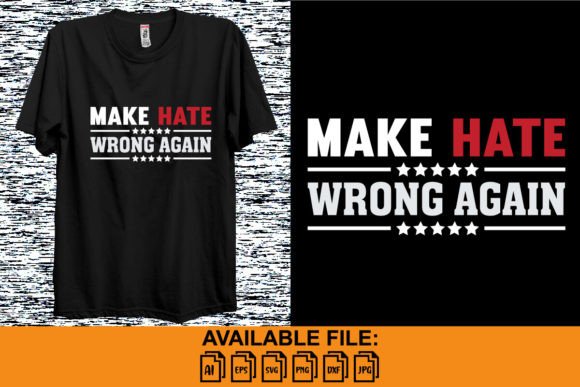
At its core, the "Make Hate Wrong Again" design taps into a cultural moment. It's bold, direct, and unapologetic—qualities that make it ideal for merchandise, apparel, and print-on-demand projects. The typography is clean and legible, which matters enormously when you're working with electronic cutting machines. Intricate scripts and overly decorative fonts might look beautiful in a mockup, but they can become a nightmare when you're weeding vinyl or layering heat transfer material. This design strikes a balance between stylistic punch and practical cut-ability.
The visual hierarchy is well-considered too. The phrase itself is structured so the eye moves naturally from "Make" through "Hate Wrong" to "Again," creating a rhythm that reinforces the message. For anyone working in branding or editorial design, you already know how much that kind of intentional flow matters. It's the difference between a design that gets read at a glance and one that gets ignored.
File Formats That Actually Work for Real Projects
One of the most frustrating experiences in digital crafting is purchasing a design only to discover the file formats don't match your workflow. This package solves that problem by including six formats: AI, EPS, SVG, DXF, JPG, and PNG. Each serves a distinct purpose, and understanding how to use them can save you hours of troubleshooting.
The SVG file is the workhorse for most cutting machine users. It works seamlessly with Cricut Design Space, Silhouette Studio (Designer Edition and above), and Brother ScanNCut. SVG files maintain clean vector paths, which means your cuts will be sharp regardless of how much you scale the design up or down. If you're creating anything from a small chest logo to a full-back T-shirt print, the SVG format preserves quality at every size.
The DXF file is essential for Silhouette Studio Basic Edition users who don't have SVG import capability. It's an older format, but it remains widely supported and gets the job done for simple cutting tasks. The AI and EPS files are your go-to options if you're working in Adobe Illustrator, CorelDRAW, or Affinity Designer. These vector formats give you full editing control—adjust colors, modify letter spacing, add effects, or incorporate the design into larger compositions.
For print-based projects, the PNG file with a transparent background is incredibly useful. You can drop it directly into Canva, Photoshop, or any mockup generator without worrying about white box backgrounds or color contamination. The JPG file works well for digital previews, social media posts, or when you need a quick visual reference with a solid background.
Practical Applications Beyond T-Shirts
While the name suggests apparel, limiting this design to T-shirts would be a missed opportunity. Consider how it could work across a range of creative and commercial projects:
- Stickers and decals – Cut from vinyl for laptops, water bottles, car windows, and notebooks. The bold lettering translates well at smaller sizes.
- Tote bags and accessories – Iron-on or heat press applications work beautifully with clean, well-spaced typography like this.
- Posters and wall art – Scale the AI or EPS file to large format for event displays, protest art, or gallery prints.
- Social media graphics – Use the PNG file as an overlay or standalone graphic for Instagram stories, Facebook posts, or Twitter banners.
- Digital products – If you sell downloadable designs on Etsy or Creative Market, this file set gives you a foundation to build derivative products.
- Packaging inserts – Small businesses with a social mission can incorporate the message into thank-you cards, box liners, or branded tissue paper.
- Event merchandise – Fundraisers, rallies, community events, and nonprofit campaigns often need impactful designs that communicate values quickly.
The versatility here is genuinely practical. A single purchase gives you enough material to build out a cohesive product collection without starting from scratch each time.
Pairing This Design with the Right Materials and Context
Design doesn't exist in a vacuum. The materials you choose, the colors you pair, and the context in which you present the work all shape how people receive the message. Here are a few practical considerations worth thinking through before you start cutting or printing.
Color contrast matters. If you're cutting vinyl for a dark T-shirt, white or light-colored material will give you maximum readability. On lighter garments, black or deep navy works well. For a more editorial or fashion-forward approach, consider unexpected color combinations—forest green on cream, burgundy on charcoal—but always test a small sample first to make sure the text remains legible.
Scale thoughtfully. A design that reads clearly at 12 inches across might lose its impact at 3 inches. If you're using this for stickers or small merchandise items, consider simplifying or isolating key words from the phrase. The included vector formats make this kind of editing straightforward.
Think about your audience. This is a message-driven design, which means it resonates most strongly with people who share or support the sentiment. If you're selling products, make sure your marketing channels align with communities that will appreciate the message. Forced virality rarely works—authentic connection does.
Tips for Getting Clean Cuts Every Time
Even the best design files can produce frustrating results if your machine settings aren't dialed in. A few reminders that experienced crafters swear by:
- Always do a test cut first. Use a small corner of your material to check blade depth, pressure, and speed before committing to the full design.
- Mirror your design for heat transfer vinyl. It sounds obvious, but forgetting to mirror is one of the most common mistakes—and one of the most expensive when you're working with specialty materials.
- Weed slowly around tight curves. The letterforms in this design are mostly clean and angular, which makes weeding easier than highly script-based fonts, but patience still pays off.
- Use transfer tape appropriate for your project. Strong grip tape for glitter vinyl, standard grip for smooth vinyl, and light grip for delicate materials like stencil film.
- Keep your blade fresh. A dull blade causes tearing, incomplete cuts, and jagged edges. Replace it regularly, especially when working with thicker materials.
Why Message-Driven Design Still Resonates
In a market flooded with generic graphics and template-driven aesthetics, designs that carry genuine meaning stand out. The "Make Hate Wrong Again" T-shirt design isn't just a collection of words on a shirt—it's a statement that people can wear, display, and share as an extension of their values. For creators and small business owners, tapping into that kind of emotional resonance is one of the most effective ways to build a loyal customer base.
Think about the brands and creators you follow. Chances are, at least some of them stand for something beyond their products. When your design assets reflect real beliefs and real conversations, your work becomes more than a transaction. It becomes a connection. And in a crowded marketplace, that connection is what keeps people coming back.
Whether you're cutting your first vinyl project or running an established print-on-demand shop, having access to clean, versatile, message-driven design files gives you a creative foundation worth building on. The included AI, EPS, SVG, DXF, JPG, and PNG formats mean you're ready for virtually any platform, machine, or project type—without needing to convert, re-trace, or compromise on quality.